Introduction
Have you ever wondered why some keyboards feel so incredibly smooth and satisfying to type on? The secret lies in the keyboard switches beneath every key. Among all the different types of mechanical keyboard switches available today, linear switches are the most popular choice for gamers, fast typists, and keyboard enthusiasts around the world. Linear switches are loved for their smooth, consistent, and uninterrupted keystroke from top to bottom.
Unlike tactile or clicky switches, linear switches have no bump or click in the middle of the keystroke. This makes them incredibly fast, quiet, and comfortable for long typing and gaming sessions. Furthermore, understanding linear keyboard switches can help you make the right choice when buying your next mechanical keyboard. In this article, we will explore everything you need to know about linear keyboard switches — what they are, how they work, the best types available, and how to choose the right one for your needs.
What Are Linear Keyboard Switches?
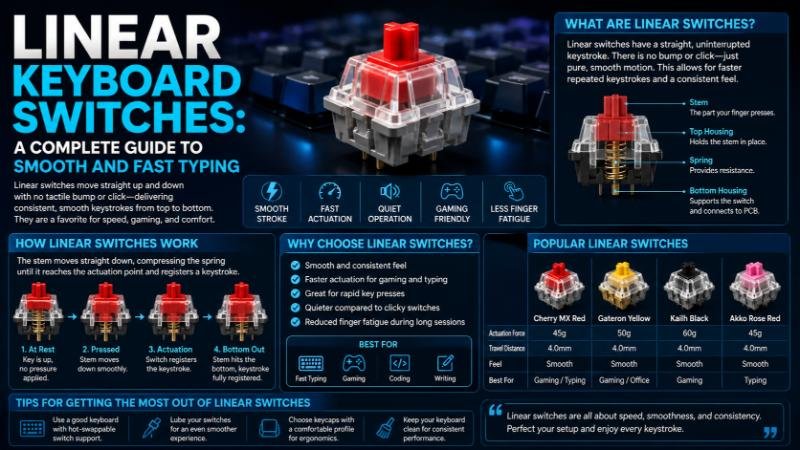
Linear keyboard switches are a type of mechanical switch that moves straight down in a smooth and consistent motion when pressed. There is no tactile bump or audible click during the keystroke. Furthermore, the switch travels smoothly from the top position all the way down to the bottom without any interruption or resistance change.
This smooth linear motion makes these switches extremely popular among:
- Gamers who need fast and consistent keypresses
- Typists who prefer a quiet and smooth typing experience
- Office workers who need silent keyboards in shared workspaces
Moreover, linear switches are generally easier on the fingers during long sessions because they require less force and have no sudden resistance points during the keystroke.
How Do Linear Switches Work?
Every mechanical keyboard switch consists of several key components including the stem, spring, housing, and contacts. In a linear switch, when you press a key, the stem moves straight down compressing the spring. Furthermore, the electrical contacts complete the circuit at the actuation point, registering the keypress. The key difference between linear and other switch types is that this entire motion happens smoothly and consistently without any tactile feedback or clicking sound. Therefore, the typing experience feels fluid, fast, and effortless.
The two most important specifications of any linear switch are:
Actuation Force — The amount of force required to register a keypress, measured in grams (g). Lower actuation force means lighter and faster keypresses.
Travel Distance — The total distance the switch travels from top to bottom, usually measured in millimeters (mm). Most linear switches have a total travel distance of 4mm.
Best Linear Keyboard Switches
1. Cherry MX Red
The Cherry MX Red is the most popular and widely recognized linear switch in the world. It has a light actuation force of just 45g, making it extremely easy and fast to press. Furthermore, its smooth keystroke and quiet operation make it ideal for both gaming and office use. Cherry MX Red switches are available in almost every major mechanical keyboard brand.
2. Cherry MX Speed Silver
The Cherry MX Speed Silver is designed specifically for competitive gaming. It has a shorter actuation point of just 1.2mm compared to the standard 2mm, making it the fastest Cherry MX linear switch available. Moreover, it has the same light 45g actuation force as the Red switch, making it incredibly fast and responsive.
3. Gateron Yellow
The Gateron Yellow is widely considered one of the smoothest and most affordable linear switches available. It has a slightly heavier actuation force of 35g, making it even lighter than Cherry MX Reds. Furthermore, Gateron switches are known for being smoother than Cherry switches at a lower price point, making them extremely popular among keyboard enthusiasts and budget-conscious buyers.
4. Gateron Red
The Gateron Red is the direct competitor to the Cherry MX Red. It offers a very similar typing experience with a 45g actuation force and smooth linear motion. However, many users actually prefer Gateron Reds over Cherry Reds because they feel slightly smoother and cost less. Moreover, Gateron switches are widely available and compatible with most mechanical keyboards.
5. Razer Yellow
The Razer Yellow linear switch is Razer’s own custom linear switch designed for gaming performance. It has a very light 45g actuation force and an ultra-short 1.2mm actuation point. Furthermore, Razer Yellow switches are optimized for speed and are available in Razer’s popular gaming keyboards.
6. Kailh Speed Copper
The Kailh Speed Copper is a fast linear switch designed for gaming. It features a short actuation distance and smooth linear feel. Moreover, Kailh switches are known for their durability and are rated for up to 70 million keypresses, making them one of the longest-lasting options available.
7. Topre Switches
Topre switches are a unique hybrid between mechanical and rubber dome switches. They use a capacitive mechanism with a spring and rubber dome that creates an incredibly smooth and satisfying linear feel. Furthermore, Topre switches are considered premium switches and are found in high-end keyboards like the Happy Hacking Keyboard (HHKB).
Linear Keyboard Switches Comparison
| Switch | Actuation Force | Actuation Point | Total Travel | Best For |
|---|---|---|---|---|
| Cherry MX Red | 45g | 2.0mm | 4.0mm | Gaming and Typing |
| Cherry MX Speed Silver | 45g | 1.2mm | 3.4mm | Competitive Gaming |
| Gateron Yellow | 35g | 2.0mm | 4.0mm | Budget Gaming and Typing |
| Gateron Red | 45g | 2.0mm | 4.0mm | Gaming and General Use |
| Razer Yellow | 45g | 1.2mm | 3.5mm | Gaming Performance |
| Kailh Speed Copper | 40g | 1.1mm | 3.5mm | Fast Gaming |
| Topre 45g | 45g | 2.0mm | 4.0mm | Premium Typing Experience |
| Gateron Black | 60g | 2.0mm | 4.0mm | Heavy Typists |
| Cherry MX Black | 60g | 2.0mm | 4.0mm | Precise Typing |
| Kailh Red | 50g | 1.9mm | 4.0mm | General Gaming and Typing |
Linear vs Tactile vs Clicky Switches
Understanding the difference between the three main types of mechanical switches helps you make a better buying decision:
Linear Switches provide a smooth and consistent keystroke with no bump or click. They are fast, quiet, and ideal for gaming and office use. Furthermore, they are the best choice for people who prefer a clean and uninterrupted typing experience.
Tactile Switches have a small bump in the middle of the keystroke that provides physical feedback when the key is actuated. They are great for touch typists who want to feel when a keypress has been registered. Moreover, tactile switches like the Cherry MX Brown are a popular all-rounder choice.
Clicky Switches have both a tactile bump and an audible click sound at the actuation point. They are satisfying to type on but can be very loud and disruptive in shared environments. Therefore, clicky switches like the Cherry MX Blue are best for home use only.
How to Choose the Right Linear Switch
Choosing the right linear switch depends on your personal preferences and use case. Here are some important factors to consider:
For Gaming: Choose a switch with a short actuation point and light actuation force. The Cherry MX Speed Silver, Razer Yellow, or Kailh Speed Copper are excellent choices for competitive gaming.
For Typing: Choose a switch with a comfortable actuation force and smooth feel. The Gateron Yellow or Cherry MX Red are great options for long typing sessions.
For Office Use: Choose a quiet linear switch with a light actuation force. The Cherry MX Red or Gateron Red are ideal for office environments because they are smooth and relatively quiet.
For Budget Buyers: Gateron switches offer excellent smoothness and performance at a lower price point than Cherry MX switches. Furthermore, they are widely available and compatible with most keyboards.
Conclusion
Linear keyboard switches are the perfect choice for anyone who values speed, smoothness, and consistency in their typing or gaming experience. From the iconic Cherry MX Red to the ultra-smooth Gateron Yellow, there is a linear switch for every preference and budget. Furthermore, understanding the differences between various linear switches helps you make a confident and informed decision when choosing your next mechanical keyboard. Whether you are a competitive gamer looking for the fastest response time or a professional typist seeking a smooth and quiet keyboard, linear switches deliver an exceptional experience that is hard to beat. Therefore, explore your options, try different switches if possible, and find the perfect linear switch that matches your unique needs and style.
FAQs: Linear Keyboard Switches
Q1. What is the smoothest linear keyboard switch?
A. The Gateron Yellow is widely considered the smoothest linear switch available. It has a very light 35g actuation force and an extremely smooth keystroke that outperforms many more expensive options.
Q2. Are linear switches good for gaming?
A. Yes! Linear switches are the best choice for gaming because they are fast, smooth, and consistent. Switches like Cherry MX Speed Silver and Razer Yellow are specifically designed for competitive gaming performance.
Q3. Are linear switches loud or quiet?
A. Linear switches are much quieter than clicky switches. They produce a soft thud sound when bottoming out. However, adding O-rings or foam dampeners can make them even quieter for office use.
Q4. What is the difference between Cherry MX Red and Gateron Red?
A. Both have similar specs with 45g actuation force. However, Gateron Red is generally considered smoother and more affordable than Cherry MX Red, making it a popular budget alternative.
Q5. How long do linear switches last?
A. Most linear switches are rated for 50 to 100 million keypresses. Cherry MX switches are rated for 100 million, while Kailh switches are rated for 70 million keypresses, making them extremely durable for long-term use.